
A Message from the Director of Advising
Hi, Students! This is Lesley Clinard the Director of Advising.
We’ve heard from some students who have missed advising (or other) meetings because Outlook or Bookings was set to the wrong time zone. When this happens, meetings may appear at the wrong time, even if the calendar invite looks correct.
Before scheduling or attending an advising appointment, please do this quick check. This only takes about a minute and can prevent missed meetings.

Quick Check Steps
Check your Outlook time zone
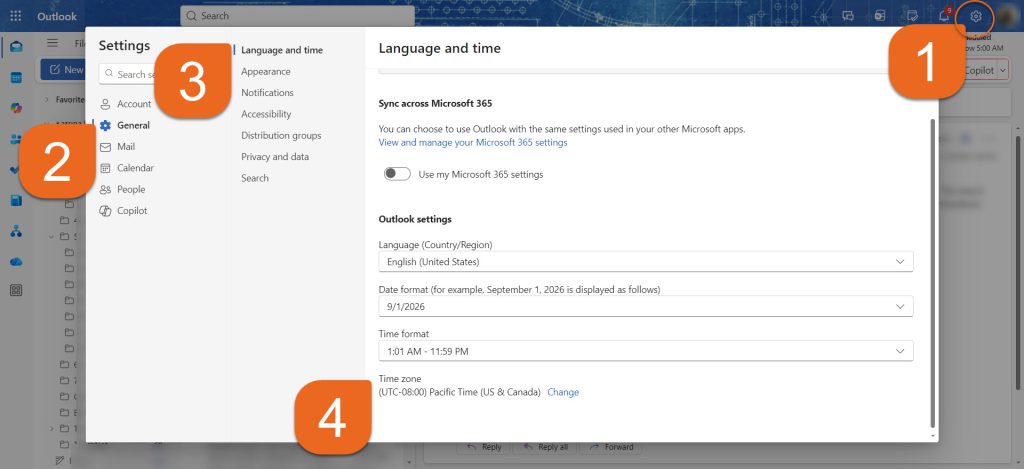
- Open Outlook on the web and click the Settings icon (top right)
- Go to General
- Select Language and Time
- Make sure your time zone is set to Eastern Time
- If it’s not, select Change, update it and Save
If your advisor uses Bookings…
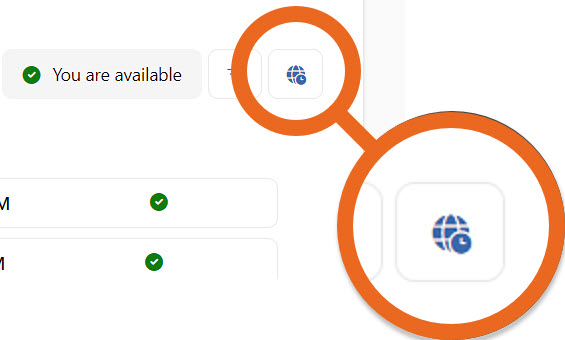
- Look for the time zone label/icon on the booking page (for example: “All times shown in Eastern Time”)
- Use the time zone dropdown if available
- Confirm the meeting time in your Outlook calendar after booking
Note: If your time zone is incorrect, your meeting may appear at different times on your and your advisor’s calendars.
Need Help?
For help with Outlook and Bookings settings: Contact the Help Desk at Help.Desk@kzoo.edu
For advising questions: Message me, Lesley Clinard, directly in Teams.